The complete apartment management platform

We make apartment living effortless.

Video intercom answered on a resident's own phone, delivery lockers, common area bookings, visitor access, resident notifications, digital displays, and emergency broadcast — all in one dashboard, all reachable over WhatsApp. No apps for residents, no separate systems to juggle.

No wiring to apartments
Works in any building
21-day free trial
Australian made
Evolution Unit 104 Unlock door Small Med Lg Gloss white timber lockers — 62 doors iPad terminal
The platform, in action

Every screen shown here is the real product

Not mockups — these are live screenshots from a running building, taken exactly as a visitor, resident, or manager would see them.

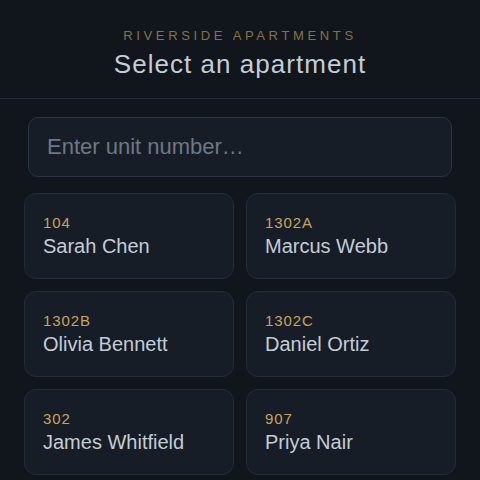
Tablet intercom directory showing apartment numbers and resident names

Intercom, answered on a phone

A visitor taps an apartment on the tablet directory; the resident answers a live video call on their own phone, from anywhere.

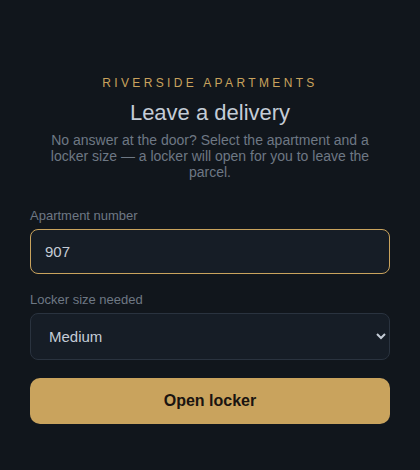
Courier screen for leaving a parcel in a delivery locker

Delivery lockers

Couriers pick a locker size and drop the parcel — no key exchange, no waiting around for someone to be home.

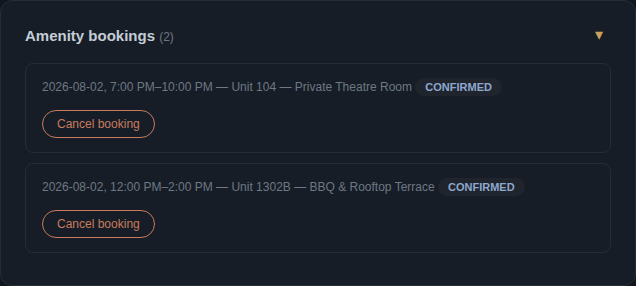
Manager dashboard showing confirmed amenity bookings

Common area bookings

Managers set the schedule once; every BBQ, gym or theatre room booking shows up here automatically — no spreadsheet required.

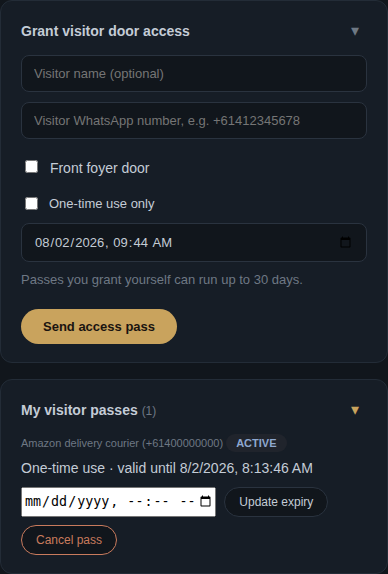
Resident portal screen for granting a visitor door access pass

Visitor access

Residents or managers issue a self-expiring visitor pass in seconds — no fobs to hand out or collect back.

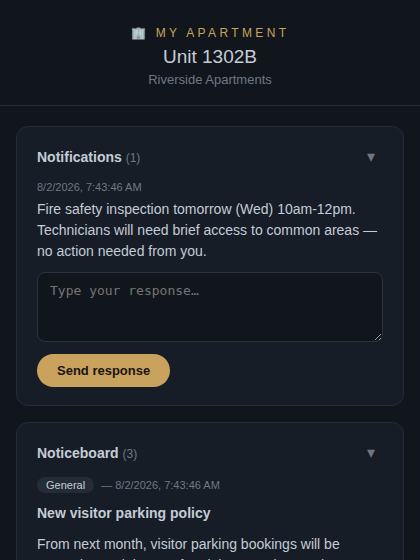
Resident portal showing notifications and the building noticeboard

Resident notifications

Building notices and manager updates land straight in a resident's own portal — no more corkboard in the lobby.

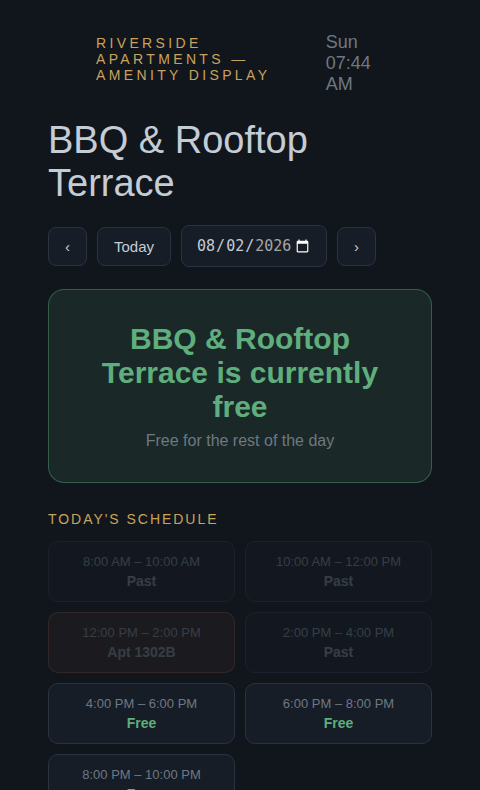
Amenity kiosk display showing live BBQ area availability

Digital displays

A screen at the BBQ or gym shows live availability at a glance — or print a QR code instead of mounting a screen.

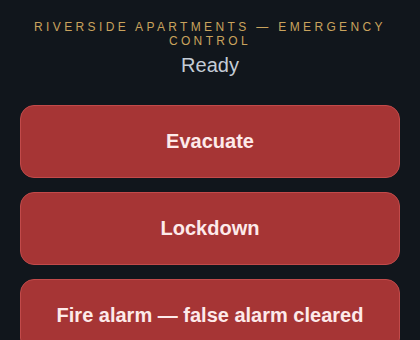
Emergency control screen with Evacuate and Lockdown buttons

Emergency procedures

Alert every resident at once over WhatsApp and see who has confirmed they're safe — all from a manager's own phone.

For builders & developers

Save a fortune on intercom installations

Traditional apartment intercom systems require running cables from the front door to every single apartment — a costly, disruptive process that can add tens of thousands of dollars to a construction project. Evolution Lockers eliminates all of that. One iPad at the front door, connected to your existing WiFi, gives every apartment its own fully functional video intercom. No cabling. No conduit. No tradespeople going room to room.

Talk to us about your development
Traditional intercom
$800+
per apartment for cabled systems
Our Intercom
$49
per building per month — no cabling
Hardware needed
1 iPad
wall-mounted at the front door
Setup time
<1 hr
self-configuring, no electricians
See it in action

Watch how it works

From visitor arriving at the door to resident answering on their phone — the complete Evolution Lockers experience in under 30 seconds.

Tap to play — see the full intercom experience in action

0
Cables to run to apartments
24/7
Secure delivery access
3
Locker sizes available
100%
Australian made lockers
How the intercom works

A complete intercom system — no cabling required

Evolution Lockers replaces the entire traditional intercom infrastructure with a single wall-mounted iPad at the building's front door. Residents use their own smartphones — there's nothing to install in each apartment, and no cabling to run through the building.

1

Visitor selects an apartment

The visitor arrives at the front door and taps the apartment number (or the resident's name) on the iPad touchscreen. The directory is managed by the building manager and updated instantly — no hardware changes needed when residents move in or out.

2

Resident receives a WhatsApp notification

The resident's phone receives an instant WhatsApp message — the most widely used messaging platform in Australia. They tap a link in the message to answer, no app download required. The call works from anywhere in the world, not just within the building's WiFi range.

3

Live video call between door and resident

A two-way video call connects the resident's phone to the iPad camera at the front door. The resident can see and speak to whoever is at the door in real time, just like a FaceTime or video call — but triggered automatically by the visitor.

4

Resident takes action from their phone

During the call, the resident can unlock the foyer door remotely with a single tap — no need to physically go downstairs. If the visitor is a courier, the resident can also open one of the delivery lockers directly from the same screen.

Works on any smartphone

Residents answer calls on their existing iPhone or Android phone via WhatsApp — the most widely used messaging app in Australia. No dedicated handset, no intercom panel in the apartment, and no app to download and maintain. The WhatsApp notification link opens a secure web page in their browser.

Answer from anywhere in the world

Because calls are delivered via WhatsApp over the internet, residents can answer their door from anywhere — whether they're in another apartment upstairs, at work across the city, or travelling overseas. The system works as long as the resident has mobile data or WiFi.

Just one device at the front door

The entire system runs on a single iPad Mini wall-mounted at the building entrance — available in lockable enclosures designed for commercial use. The iPad connects to the building's existing WiFi. There is no server room equipment, no phone lines, and no per-apartment hardware to install or maintain.

Missed calls handled automatically

If a resident doesn't answer the intercom call, the system can still handle the visitor — either by displaying instructions on the iPad screen, or (with the full locker system) allowing couriers to independently leave a parcel in a delivery locker and notify the resident via WhatsApp.

No iPad? No problem.

Just print a QR code

Don't want to invest in a wall-mounted iPad? No problem. Evolution Lockers can generate a unique QR code for your building that does exactly the same job — for the cost of a picture frame.

Visitors scan the QR code with their phone camera — no app required. The same resident directory opens instantly in their browser, they select an apartment, and the resident receives the WhatsApp video call on their phone. The entire intercom experience, with zero hardware at the door.

Zero hardware cost
Print the QR code, put it in a frame, mount it on the wall. Total cost under $20.
No power required
A printed QR code needs no electricity, no WiFi at the door, and no maintenance.
Works on every smartphone
Any iPhone or Android camera scans the QR code and opens the intercom in the browser — no app to download.
Perfect for trying the system
Start with a QR code on your free trial. Upgrade to a wall-mounted iPad later if you want a more polished look.
Start free trial — try it with a QR code
SCAN TO CALL A RESIDENT RIVERSIDE APARTMENTS EVOLUTION LOCKERS Riverside Apartments Select apartment Call Unit 104
Visitor scans the framed QR code → intercom opens in their browser → resident gets WhatsApp call
Choose your solution

Five ways to use Evolution Lockers

From a single front door to a full apartment building. Start with what you need today — upgrade as your requirements grow.

Individual house
$5/month per house

A self-install intercom for a single house or townhouse. Print your QR code, stick it by the front door, and you're done — no iPad, no installer visit, set up entirely by you in minutes.

  • QR code sticker at your front door
  • Self-service setup — no installer needed
  • Up to 2 residents / phone numbers
  • Instant WhatsApp video call notification
  • Resident answers from anywhere in the world
  • 21-day free trial — no credit card needed
  • Door release controller
  • Delivery lockers
Start free trial
Intercom only
From $49.50/month per building

A complete video intercom system using just one iPad at the front door. No cabling to apartments, no hardware per unit, no electricians. Perfect for builders and strata managers who want a modern intercom without the cost and disruption of traditional installations.

  • iPad kiosk at the front door
  • Resident directory — unlimited apartments
  • Instant WhatsApp notification to residents
  • Live two-way video call
  • Resident answers from anywhere in the world
  • Building manager web dashboard
  • Door release controller
  • Delivery lockers
Get a quote
Full system
From $440/month + hardware

The complete Evolution Lockers experience — video intercom, remote door release, and a bank of smart delivery lockers in the foyer. Couriers can leave parcels 24/7 without the resident needing to be home. Residents retrieve their parcels at their convenience with a single WhatsApp tap.

  • Everything in Intercom + door release
  • Gloss white timber locker unit (Australian made)
  • Small, medium and large locker doors
  • Courier access panel on the locker unit
  • Automatic locker assignment when courier arrives
  • WhatsApp pickup link sent to resident instantly
  • Building manager locker status dashboard
  • Manager can remotely open & clear lockers
Get a quote
Total apartment management
From $550/month + hardware

Everything your building needs in one platform — the full intercom and locker system, plus the resident portal, bookings, visitor management and safety tools that turn a smart intercom into complete apartment management.

  • Everything in Full system
  • Resident self-service portal
  • Maintenance requests, tracked to resolution
  • Amenity booking, with kiosk displays included
  • Visitor access passes & visitor parking
  • Digital noticeboard
  • Emergency broadcast & resident safety check-ins
  • Multi-building support
Get a quote
Step by step

How each solution works

Select a scenario to see the exact flow from start to finish.

01

Guest arrives at the front door

The guest approaches the iPad kiosk and taps the apartment number or searches the resident's name in the directory. The screen shows a clean, easy-to-use interface.

02

Resident's phone receives a WhatsApp message

Instantly, the resident receives a WhatsApp notification: "Someone is at your front door — tap to see and speak to them." The link opens directly in their phone's browser, no app required.

03

Live video call & door release

A two-way video call connects the guest at the door to the resident's phone. The resident can see who's there, have a conversation, and tap "Unlock door" to let them in — all from wherever they are.

01

Courier arrives with a parcel

The courier taps the apartment number on the iPad. The resident receives a WhatsApp call notification and answers. The courier announces the delivery.

02

Resident selects a locker size

On the video call screen, the resident sees three locker size buttons — Small, Medium and Large. They tap the appropriate size for the parcel being delivered.

03

Locker opens, resident notified

The next available locker of that size opens automatically. The courier's iPad screen shows which locker number to use. Simultaneously, the resident receives a WhatsApp pickup link for later retrieval.

01

Courier can't reach the resident

The resident doesn't answer the intercom call. Rather than leaving with the parcel, the courier can use the courier access mode on the iPad — no login required.

02

Courier selects apartment and locker size

The courier enters the apartment number and selects the locker size they need. The system verifies the apartment exists in the building directory.

03

Locker opens, resident notified automatically

A locker opens immediately. The courier places the parcel and closes the door. The resident automatically receives a WhatsApp message with a secure link to open their locker when ready.

01

Resident receives a WhatsApp notification

Whether they answered the courier call or not, the resident receives a WhatsApp message: "You have a delivery in Locker #3 at Riverside Apartments. Tap to open it."

02

One tap opens the locker

The resident taps the secure link in the WhatsApp message. Their browser opens a page with a single "Open locker" button. One tap sends the command to the locker controller.

03

Locker opens, parcel collected, locker resets

The locker door releases. The resident collects their parcel. The locker is automatically marked as available again — ready for the next delivery, with no manual reset required.

For builders & developers

Eliminate intercom cabling from your next project

Traditional apartment intercom systems are one of the most expensive and disruptive parts of a construction project. Every apartment needs its own handset, and every handset needs to be cabled back to a master station at the front door — through walls, ceilings, and risers. Evolution Lockers eliminates this entirely.

No per-apartment hardware or cabling

Residents use their own smartphones. There is nothing to install, cable, or commission in individual apartments. For a 50-apartment building, that's 50 sets of hardware and 50 cable runs you simply don't need.

Works in any existing building

Because there's no cabling to run, Evolution Lockers can be installed in completed buildings, heritage-listed properties, and retrofits where running new cabling would be cost-prohibitive or physically impossible.

Future-proof from day one

Adding or removing apartments from the directory takes seconds in the web dashboard — no rewiring, no hardware changes. The system scales instantly to any building size, and residents can be updated without any on-site visits.

One point of installation

The entire installation is a single iPad in a wall-mounted enclosure at the building entrance. Connection to your existing WiFi network is all that's required. A qualified electrician is only needed if you're adding a door release controller or delivery lockers.

Traditional vs Evolution Lockers

Installation item
Traditional intercom
Evolution Lockers
Cabling per apartment
Yes — every unit
None required
Handset per apartment
Yes — $200–$400 each
Residents use their phone
Master station hardware
Required — specialist install
1 iPad (off the shelf)
Answer from outside building
No
Yes — from anywhere
Update resident directory
Technician visit
Web dashboard — instant
Retrofit to existing building
Costly & disruptive
Simple — no new cabling
Ongoing cost (50 apartments)
Maintenance contracts
$49.50/month flat
Delivery lockers

Smart parcel lockers, beautifully made

Our delivery lockers are Australian-made from 18mm timber with a gloss white finish — designed to complement the architecture of a modern apartment foyer, not detract from it. Three door sizes mean every parcel finds a home.

📦

Small

Envelopes, small parcels, pharmacy deliveries

📫

Medium

Shoes, books, standard online shopping orders

🗃️

Large

Clothing, larger parcels, grocerydeliveries

Standard unit: 48 small, 12 medium, 2 large doors. Custom configurations available on request.

The delivery flow

Courier arrives — resident answers or not

The courier uses the iPad to call the resident. If the resident answers, they open a locker during the call. If there's no answer, the courier uses courier access mode on the iPad to assign a locker independently.

Locker opens automatically

The system selects the next available locker of the right size and unlocks it. The locker number appears on the iPad screen so the courier knows exactly where to go.

Resident notified via WhatsApp

The moment the locker is assigned, the resident receives a WhatsApp message with a secure, unique link to open their locker whenever they are ready to collect.

Resident taps link to open locker

When ready, the resident taps the WhatsApp link. One button opens the locker. The parcel is collected and the locker resets to available automatically.

Locker ready for the next delivery

No manual reset needed. Building managers can view all locker statuses in real time and manually override any locker from the dashboard if needed.

For residents

One link. Everything a resident needs.

Every resident gets a permanent, private link to their own portal — reachable from any WhatsApp message they've ever received, and saveable to their phone's home screen. No app, no password to remember.

Notifications & replies

View and respond to manager notices — poll-style options or a free-text reply — right from their phone.

Parcel status & pickup

See their assigned locker and pickup link the moment a delivery arrives, with no need to check in person.

Maintenance & amenities

Submit maintenance requests and book shared amenities — covered in full below.

Visitor access & parking

Grant their own visitor passes or book visitor parking directly, if the manager has enabled it for residents.

Day-to-day operations

Maintenance requests & amenity booking

Two of the most common reasons residents contact a building manager — now fully self-service, with everything logged and timestamped.

Maintenance requests

Categorised & prioritised

Plumbing, electrical, appliance, common area, or other — with a low/normal/urgent flag so nothing critical gets buried.

Tracked to resolution

Managers move requests through open → in progress → resolved, with a note back to the resident at each step.

Amenity booking

Manager-defined schedules

Set which days an amenity is open, its opening/closing window, and the booking slot length — the system builds the calendar.

No double-bookings, ever

Booking is race-safe at the database level — two residents tapping the same slot at once can't both win it.

Resident experience New

Amenity displays — status at a glance

A screen mounted right at the BBQ area, gym, or theatre room — showing live availability at a glance, no login, no app. Print a QR code instead of mounting a screen and it works exactly the same way.

Live status at a glance

"Free now" or "Booked by Apt 1302B until 3:00 PM" — always correct for the building's own local time.

Full day's schedule

Every slot for the day shown at once, with which unit holds each one — plus navigation to browse and book future days too.

Optional walk-up booking

Managers can allow booking directly from the screen — a resident taps their unit from a filtered list, no fiddly typing, and picks a free slot.

A WhatsApp receipt, every time

Any booking made from the screen sends a confirmation to that unit's WhatsApp — a built-in safety net so a resident always knows if someone booked under their name.

Visitor & access management

Visitor passes & parking, without the manual admin

Give tradespeople, cleaners, or family the access they need — without a resident meeting them at the door, or a manager allocating a parking spot by hand.

Visitor access passes

Issued in seconds, self-expiring

Managers grant passes for any visitor, or let residents grant their own. A validity window means there's no fob to collect back.

Scoped to specific doors

Each pass covers exactly the doors it should — never blanket access to the whole building. One-time-use is available too.

Visitor parking management

Pool or named bays

Choose a shared numbered pool with a fixed capacity, or specific named bays — whichever matches how your car park works.

Automatic boom gate access & frequency caps

Booking a spot automatically issues boom gate access for that date, and managers can limit how many nights the same rego books.

Communication & safety

From building notices to emergency broadcast

Replace the corkboard in the lobby, and give managers a way to reach every resident at once when it matters most.

Digital noticeboard

Post once, appear everywhere

A notice shows on the resident portal and on a standalone lobby screen at the same time — categorised, with an optional expiry date.

No hardware required

A lobby screen is a nice-to-have, not a must — the noticeboard works perfectly well through the resident portal alone.

Emergency broadcast — one tap, whole building

Configurable emergency buttons

Set up as many as you need — "Evacuate", "Lockdown", "Fire" — each with its own message and behaviour, including doors held open automatically.

Instant WhatsApp broadcast

Every resident is messaged at once, with a link straight to their own portal — not a generic page.

Residents confirm they're safe

From their portal, residents tap "I'm safe" or request assistance — the manager sees a live, rolling list of who needs help and where.

Full control from a manager's phone

A private, permanent link a manager saves to their home screen — full emergency control with no login needed, no laptop required.

Designed to complement your building's certified fire and life-safety systems, not replace them.
For building managers

Total visibility, zero complexity

A simple web-based dashboard gives building managers complete visibility and control — no software to install, accessible from any browser on any device.

Talk to us about your building

Resident directory management

Add, update or remove apartments and WhatsApp numbers in seconds. Changes are instant — no technician visit, no hardware update needed.

Real-time locker dashboard

See every locker's status — empty, in use, or awaiting collection — with the apartment number assigned to each in-use locker.

Remote locker override

Open and clear any locker remotely from the dashboard — useful when residents haven't collected after extended periods, without needing to visit the building.

Multi-building support

Property managers overseeing multiple buildings can have separate accounts for each property. Each manager only sees their own building's data.

Common questions

Frequently asked questions

What happens if the internet goes down?

Like any internet-dependent system, Evolution Lockers requires a working WiFi connection at the front door. We recommend a reliable NBN or business-grade connection. A 4G backup router can be added for mission-critical installations.

Does the resident need to download an app?

No. Residents only need WhatsApp, which the vast majority of Australians already have. The intercom call notification arrives as a WhatsApp message and the video call opens in the phone's browser — nothing else to install.

What door hardware is compatible?

The door release module works with electric strikes, magnetic locks, and motorised deadbolts — the most common types in Australian apartment buildings. In most cases an existing electric strike can be connected without any new door hardware.

Can the lockers be customised?

Yes. The standard unit comes in a gloss white finish with a mix of small, medium and large doors. Custom door configurations, different finishes, and bespoke sizes are available on request.

What iPad do I need?

The system is designed for the iPad Mini in a commercial wall-mount enclosure. We can supply pre-configured units with the enclosure included — ask us about this option when you get in touch.

Can multiple couriers use the system simultaneously?

Yes. Each call creates an independent session, so multiple deliveries can be handled at the same time — each assigned to its own locker. The manager's dashboard shows all active deliveries in real time.

Is there a lock-in contract?

No. The monthly subscription is charged per building, month to month. You can add buildings, remove buildings, or cancel at any time. Hardware purchased is yours to keep regardless of subscription status.

Who installs the system?

Mounting the iPad kiosk is straightforward — any handyperson can do it. Connecting a door release controller or locker unit requires a licensed electrician for low-voltage wiring. We provide full installation documentation and support throughout.

Does the emergency broadcast replace our fire alarms?

No. It's designed to complement your building's certified fire and life-safety systems, not replace them — it adds a fast, WhatsApp-based way to tell residents exactly what's happening and to see who has confirmed they're safe.

Can residents book an amenity from a screen instead of their phone?

Yes. Our amenity kiosk displays can be set up to show live availability and, if you enable it, let a resident tap their unit number and book directly from the screen — no typing, no app.

Get in touch

Let's talk about your building

Whether you're a builder, strata manager, property developer, or building owner — we'd love to understand your requirements and put together a proposal. We offer a free 21-day trial of the intercom system so you can see it working in your building before committing.

Phone
+61 450 265 900
Email
evolutionlockers@gmail.com
Location
Sydney, NSW, Australia
Free trial
21 days — start now →